[root@k8s01 ~]# kubectl apply -f pv-example.yaml persistentvolume/pv0003 created [root@k8s01 ~]# kubectl get pv NAME CAPACITY ACCESS MODES RECLAIM POLICY STATUS CLAIM STORAGECLASS REASON AGE pv0003 5Gi RWO Retain Available nfs 35s
创建服务并使用 PVC
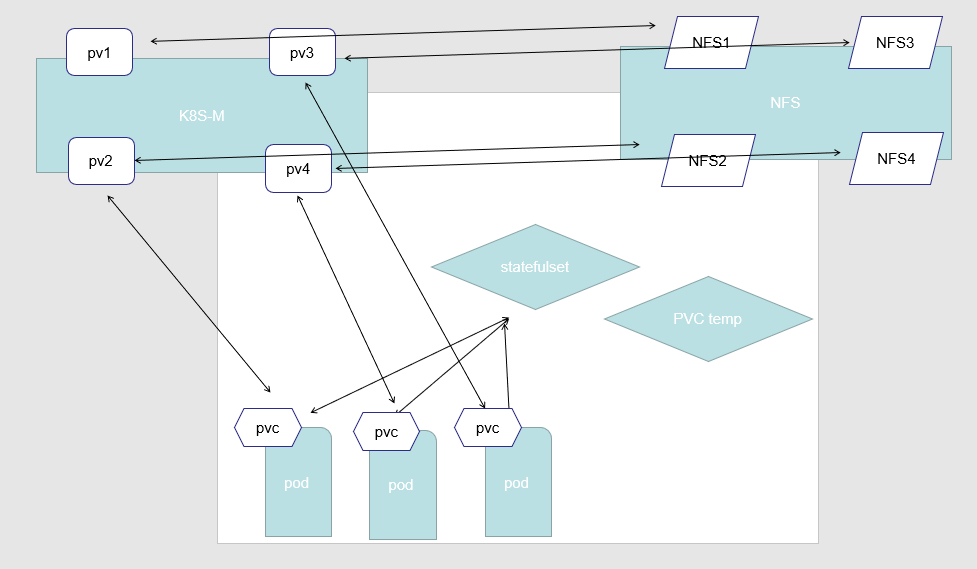
一个典型、完整可用的 StatefulSet 通常由三个组件构成: Headless Service 、 StatefulSet 和 volumeClaimTemplate 。其中,Headless Service 用于为 Pod 资源标识符生成可解析的 DNS 资源记录,StatefulSet 用于管控 Pod 资源,volumeClaimTemplate 则基于静态或动态的 PV 供给方式为 Pod 资源提供专有且固定的存储。
[root@k8s01 ~]# kubectl apply -f StatefulSet-example.yaml service/nginx created statefulset.apps/web created [root@k8s01 ~]# kubectl get pod # 有序部署 0,1,2 (0完成后才部署1) NAME READY STATUS RESTARTS AGE web-0 1/1 Running 0 12s web-1 0/1 Pending 0 10s # 一直处于 Pending 状态
## 节选,发现绑定不了 PV Events: Type Reason Age From Message ---- ------ ---- ---- ------- Warning FailedScheduling 28s (x3 over 101s) default-scheduler running "VolumeBinding" filter plugin for pod "web-1": pod has unbound immediate PersistentVolumeClaims
[root@k8s01 ~]# mkdir /nfsdata{01,02,03,04} root@k8s01 ~]# kubectl apply -f pv-example-more.yaml persistentvolume/pv01 created persistentvolume/pv02 created persistentvolume/pv03 created persistentvolume/pv04 created [root@k8s01 ~]# chmod 666 /nfsdata{01,02,03,04} [root@k8s01 ~]# chown nfsnobody /nfsdata{01,02,03,04}
[root@k8s01 ~]# kubectl describe pod web-0 # 报错 因为 没执行 echo "/nfsdata01 *(rw,no_root_squash,no_all_squash,sync)" >> /etc/exports ## systemctl restart rpcbind ## systemctl restart nfs ## 节选 Events: Type Reason Age From Message ---- ------ ---- ---- ------- Mounting command: systemd-run Mounting arguments: --description=Kubernetes transient mount for /var/lib/kubelet/pods/6c4be93c-fb32-4891-821e-817a7853c4c5/volumes/kubernetes.io~nfs/pv01 --scope -- mount -t nfs 192.168.43.101:/nfsdata01 /var/lib/kubelet/pods/6c4be93c-fb32-4891-821e-817a7853c4c5/volumes/kubernetes.io~nfs/pv01 Output: Running scope as unit run-51115.scope. mount.nfs: access denied by server while mounting 192.168.43.101:/nfsdata01 Warning FailedMount 55s kubelet, k8s03 MountVolume.SetUp failed for volume "pv01" : mount failed: exit status 32 Mounting command: systemd-run Mounting arguments: --description=Kubernetes transient mount for /var/lib/kubelet/pods/6c4be93c-fb32-4891-821e-817a7853c4c5/volumes/kubernetes.io~nfs/pv01 --scope -- mount -t nfs 192.168.43.101:/nfsdata01 /var/lib/kubelet/pods/6c4be93c-fb32-4891-821e-817a7853c4c5/volumes/kubernetes.io~nfs/pv01 Output: Running scope as unit run-51258.scope. mount.nfs: access denied by server while mounting 192.168.43.101:/nfsdata01 Warning FailedScheduling 25s (x2 over 25s) default-scheduler running "VolumeBinding" filter plugin for pod "web-0": pod has unbound immediate PersistentVolumeClaims Normal Scheduled 23s default-scheduler Successfully assigned default/web-0 to k8s03
查看信息
1 2 3 4 5 6 7 8 9 10 11 12 13 14 15 16
[root@k8s01 ~]# kubectl get pod # 有序部署 0,1,2 NAME READY STATUS RESTARTS AGE web-0 1/1 Running 0 10s web-1 1/1 Running 0 7s web-2 1/1 Running 0 3s [root@k8s01 ~]# kubectl get pvc NAME STATUS VOLUME CAPACITY ACCESS MODES STORAGECLASS AGE www-web-0 Bound pv01 2Gi RWO nfs 65s www-web-1 Bound pv03 2Gi RWO nfs 62s www-web-2 Bound pv04 2Gi RWO nfs 58s [root@k8s01 ~]# kubectl get pv NAME CAPACITY ACCESS MODES RECLAIM POLICY STATUS CLAIM STORAGECLASS REASON AGE pv01 2Gi RWO Retain Bound default/www-web-0 nfs 3m58s pv02 2Gi RWO Retain Available test 3m58s pv03 2Gi RWO Retain Bound default/www-web-1 nfs 3m58s pv04 2Gi RWO Retain Bound default/www-web-2 nfs 3m58s
匹配 Pod name ( 网络标识 ) 的模式为:$(statefulset名称)-$(序号),比如上面的示例:web-0,web-1,web-2
StatefulSet 为每个 Pod 副本创建了一个 DNS 域名,这个域名的格式为: $(podname).(headless servername),也就意味着服务间是通过Pod域名来通信而非 Pod IP,因为当 Pod 所在 Node 发生故障时, Pod 会被飘移到其它 Node 上,Pod IP 会发生变化,但是 Pod 域名不会有变化
StatefulSet 使用 Headless 服务来控制 Pod 的域名,这个域名的 FQDN 为:$(servicename).$(namespace).svc.cluster.local,其中,cluster.local 指的是集群的域名
; <<>> DiG 9.11.4-P2-RedHat-9.11.4-16.P2.el7_8.6 <<>> -t A nginx.default.svc.cluster.local. @172.18.73.121 ;; global options: +cmd ;; Got answer: ;; WARNING: .local is reserved for Multicast DNS ;; You are currently testing what happens when an mDNS query is leaked to DNS ;; ->>HEADER<<- opcode: QUERY, status: NOERROR, id: 44346 ;; flags: qr aa rd; QUERY: 1, ANSWER: 3, AUTHORITY: 0, ADDITIONAL: 1 ;; WARNING: recursion requested but not available
;; OPT PSEUDOSECTION: ; EDNS: version: 0, flags:; udp: 4096 ;; QUESTION SECTION: ;nginx.default.svc.cluster.local. IN A
;; ANSWER SECTION: nginx.default.svc.cluster.local. 30 IN A 172.18.235.145 nginx.default.svc.cluster.local. 30 IN A 172.18.235.146 nginx.default.svc.cluster.local. 30 IN A 172.18.235.155
# 定义一个块存储池 apiVersion: ceph.rook.io/v1 kind: CephBlockPool metadata: name: replicapool namespace: rook-ceph spec: # 每个数据副本必须跨越不同的故障域分布,如果设置为host,则保证每个副本在不同机器上 failureDomain: host # 副本数量 replicated: size: 3 # Disallow setting pool with replica 1, this could lead to data loss without recovery. # Make sure you're *ABSOLUTELY CERTAIN* that is what you want requireSafeReplicaSize: true # gives a hint (%) to Ceph in terms of expected consumption of the total cluster capacity of a given pool # for more info: https://docs.ceph.com/docs/master/rados/operations/placement-groups/#specifying-expected-pool-size #targetSizeRatio: .5 --- # 定义一个StorageClass apiVersion: storage.k8s.io/v1 kind: StorageClass metadata: name: rook-ceph-block # 该SC的Provisioner标识,rook-ceph前缀即当前命名空间 provisioner: rook-ceph.rbd.csi.ceph.com parameters: # clusterID 就是集群所在的命名空间名 # If you change this namespace, also change the namespace below where the secret namespaces are defined clusterID: rook-ceph
# If you want to use erasure coded pool with RBD, you need to create # two pools. one erasure coded and one replicated. # You need to specify the replicated pool here in the `pool` parameter, it is # used for the metadata of the images. # The erasure coded pool must be set as the `dataPool` parameter below. #dataPool: ec-data-pool # RBD镜像在哪个池中创建 pool: replicapool
# RBD image format. Defaults to "2". imageFormat: "2"
# Ceph admin 管理凭证配置,由operator 自动生成 # in the same namespace as the cluster. csi.storage.k8s.io/provisioner-secret-name: rook-csi-rbd-provisioner csi.storage.k8s.io/provisioner-secret-namespace: rook-ceph csi.storage.k8s.io/controller-expand-secret-name: rook-csi-rbd-provisioner csi.storage.k8s.io/controller-expand-secret-namespace: rook-ceph csi.storage.k8s.io/node-stage-secret-name: rook-csi-rbd-node csi.storage.k8s.io/node-stage-secret-namespace: rook-ceph # 卷的文件系统类型,默认ext4,不建议xfs,因为存在潜在的死锁问题(超融合设置下卷被挂载到相同节点作为OSD时) csi.storage.k8s.io/fstype: ext4 # uncomment the following to use rbd-nbd as mounter on supported nodes # **IMPORTANT**: If you are using rbd-nbd as the mounter, during upgrade you will be hit a ceph-csi # issue that causes the mount to be disconnected. You will need to follow special upgrade steps # to restart your application pods. Therefore, this option is not recommended. #mounter: rbd-nbd allowVolumeExpansion: true reclaimPolicy: Delete
apiVersion: ceph.rook.io/v1 kind: CephFilesystem metadata: name: test namespace: rook-ceph spec: # The metadata pool spec metadataPool: replicated: # Increase the replication size if you have more than one osd size: 3 # The list of data pool specs dataPools: - failureDomain: osd replicated: size: 3 # The metadata service (mds) configuration metadataServer: # The number of active MDS instances activeCount: 1 # Whether each active MDS instance will have an active standby with a warm metadata cache for faster failover. # If false, standbys will be available, but will not have a warm cache. activeStandby: true # The affinity rules to apply to the mds deployment placement: # nodeAffinity: # requiredDuringSchedulingIgnoredDuringExecution: # nodeSelectorTerms: # - matchExpressions: # - key: role # operator: In # values: # - mds-node # tolerations: # - key: mds-node # operator: Exists # podAffinity: # podAntiAffinity: resources: # The requests and limits set here, allow the filesystem MDS Pod(s) to use half of one CPU core and 1 gigabyte of memory # limits: # cpu: "500m" # memory: "1024Mi" # requests: # cpu: "500m" # memory: "1024Mi"
查看
1 2 3 4 5 6 7 8
[root@test173 ~]# kubectl get storageclasses.storage.k8s.io
NAME              PROVISIONER          RECLAIMPOLICY   VOLUMEBINDINGMODE   ALLOWVOLUMEEXPANSION   AGE
rook-ceph-block   rook-ceph.rbd.csi.ceph.com   Delete          Immediate           true                   113m

[root@test173 ~]#  kubectl get cephfilesystems.ceph.rook.io --all-namespaces
NAMESPACE   NAME      AGE
rook-ceph   test       13d
root@test173 ceph]# kubectl get pv |grep www
pvc-50fb6ff8-8d1b-11eb-b229-fad65d90ce00   100Gi      RWO            Delete           Released   default/www-web-0                   rook-ceph-block             2h
pvc-6485e1af-8d1b-11eb-b229-fad65d90ce00   100Gi      RWO            Delete           Released   default/www-web-1                   rook-ceph-block             2h
pvc-73b5a94a-8d1b-11eb-b229-fad65d90ce00   100Gi      RWO            Delete           Released   default/www-web-2                   rook-ceph-block             2h
无需再手动修改 pv ,立刻自动删除
1
[root@test173 ceph]# kubectl get pv|grep www
遇到的问题
pvc 已被其他 node 挂载
1
Warning FailedAttachVolume 32m attachdetach-controller Multi-Attach error for volume "pvc-eee48fd5-304f-49ef-be4b-420f09f43d6f" Volume is already exclusively attached to one node and can't be attached to another