Volume

📌 学习笔记:本文为学习与实践过程中整理的技术笔记,内容梳理自官方文档与网络公开资料,主要用于知识沉淀与命令速查。

容器销毁时,保存在容器内部文件系统中的数据会被清除,为了持久化保存容器数据,可以使用 Kubernetes Volume。

Volume 生命周期独立于容器,Pod 中容器可能销毁重建,但 Volume 会被保留。

emptyDir

一个 emptyDir Volume 是 Host 上的一个空目录。

emptyDir Volume 对容器是持久的。但 Pod 从节点删除时,Volume 的内容也会被删除。容器销毁而 Pod 还在,则 Volume 不受影响。

emptyDir Volume 的生命周期与 Pod 一致。

emptyDir 的用法有:

  1. 暂存空间,例如用于基于磁盘的合并排序
  2. 用作长时间计算崩溃恢复时的检查点
  3. Web 服务器容器提供数据时,保存内容管理器容器提取的文件

emptyDir-example.yaml

1
2
3
4
5
6
7
8
9
10
11
12
13
14
15
16
17
18
19
20
21
apiVersion: v1
kind: Pod
metadata:
name: test-pd
spec:
containers:
- image: nginx:1.7.9
name: test-container01
volumeMounts:
- mountPath: /cache
name: cache-volume
- name: test-container02
image: busybox:1.32.0
imagePullPolicy: IfNotPresent
command: ["/bin/sh","-c","sleep 3600"]
volumeMounts:
- mountPath: /test
name: cache-volume
volumes:
- name: cache-volume
emptyDir: {}
1
2
3
4
5
6
7
8
9
10
11
12
13
14
15
16
17
18
19
20
21
22
23
24
25
26
27
28
[root@k8s01 ~]# kubectl apply -f emptyDir-example.yaml
pod/test-pd created
[root@k8s01 ~]# kubectl get pod
NAME READY STATUS RESTARTS AGE
test-pd 2/2 Running 0 3s

[root@k8s01 ~]# kubectl exec test-pd -c test-container01 -it -- /bin/bash # 进入test-container01 下的/cache 目录
root@test-pd:/# cd cache/
root@test-pd:/cache# date >> index.txt
root@test-pd:/cache# cat index.txt
Mon Aug 31 17:03:13 UTC 2020

### 新开一个窗口
[root@k8s01 ~]# kubectl exec test-pd -c test-container02 -it -- /bin/sh # 进入test-container02 下的 /test 目录
/ # cd test
/test # ls # 发现与 test-container01 下的 /cache 目录 文件内容相同
index.txt
/test # cat index.txt
Mon Aug 31 17:03:13 UTC 2020
/test # date >> index.txt
/test # cat index.txt
Mon Aug 31 17:03:13 UTC 2020
Mon Aug 31 17:05:43 UTC 2020

### 第一个窗口
root@test-pd:/cache# cat index.txt # 内容也同步更新
Mon Aug 31 17:03:13 UTC 2020
Mon Aug 31 17:05:43 UTC 2020

实际路径,pod 调度到了 k8s03 节点上。文件位置如下

1
2
3
4
5
[root@k8s01 ~]#  kubectl get  pod/test-pd -o yaml | grep uid
uid: a6ccf3c2-6f2c-47ff-a6f5-8175e90c01f2

[root@hdp03 ~]# cat /var/lib/kubelet/pods/a6ccf3c2-6f2c-47ff-a6f5-8175e90c01f2/volumes/kubernetes.io~empty-dir/cache-volume/index.txt
Tue Sep 13 02:17:34 UTC 2022

hostPath

hostPath Volume 将 Docker Host 文件系统中已经存在的目录 mount 给 Pod 的容器。一般不会使用,因为增加了 Pod 与节点的耦合,限制了 Pod 的使用。不过那些需要访问 k8s、Docker 内部数据的应用则需要使用 hostPath。

eg: kube-apiserver、kube-controller-manager 等

kubectl edit --namespace=kube-system pod kube-apiserver-k8s-master 查看 kube-apiserver Pod 的配置。

Pod 销毁,hostPath 对应的目录还会保留。但 Host 崩溃,hostPath 就无法访问了。

使用这种卷类型时请注意

  1. 因为每个节点上的文件都不同,具有相同配置(例如从 podTemplate 创建的)的 pod 在不同节点上的行为可能会有所不同
  2. 当 Kubernetes 按照计划添加资源感知调度时,将无法考虑 hostPath 使用的资源
  3. 在底层主机上创建的文件或目录只能由 root 写入。您需要在特权容器中以 root 身份运行进程,或修改主机上的文件权限以便写入 hostPath 卷

hostPath更多使用方法

hostPath-example.yaml

1
2
3
4
5
6
7
8
9
10
11
12
13
14
15
16
17
18
apiVersion: v1
kind: Pod
metadata:
name: test-pd
spec:
containers:
- image: nginx:1.7.9
name: test-container
volumeMounts:
- mountPath: /test-pd
name: test-volume
volumes:
- name: test-volume
hostPath:
# directory location on host
path: /data
# this field is optional
type: Directory

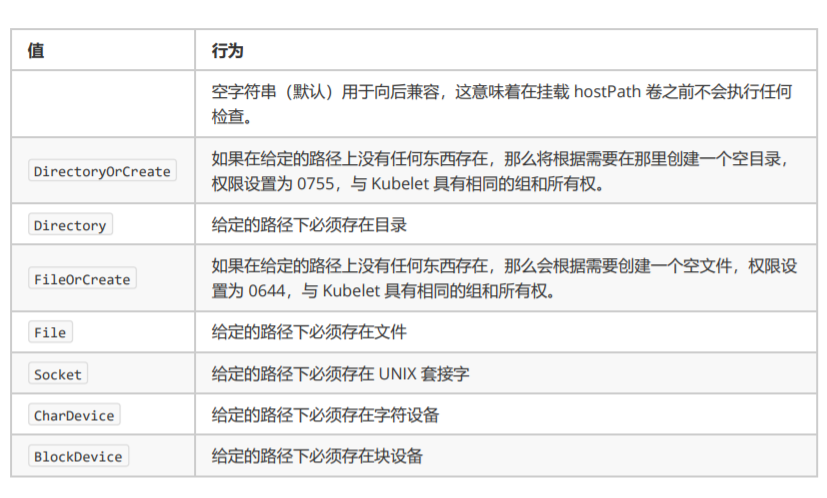
hostPath_type

1
2
3
4
5
6
7
8
9
10
11
12
13
14
15
16
17
18
19
20
21
22
23
24
25
26
27
28
29
30
31
32
33
34
35
36
37
38
39
40
41
42
43
44
45
46
[root@k8s01 ~]# kubectl apply -f  hostPath-example.yaml
pod/test-pd02 created
[root@k8s01 ~]# kubectl get pod # 一直处于 ContainerCreating
NAME READY STATUS RESTARTS AGE
test-pd 2/2 Running 0 19m
test-pd02 0/1 ContainerCreating 0 16s

[root@k8s01 ~]# kubectl describe pod test-pd02 # 查看日志,发现是因为 k8s03上没有 /data 目录

[root@k8s03 ~]# mkdir /data
[root@k8s01 ~]# kubectl describe pod test-pd02 # 节选
Events:
Type Reason Age From Message
---- ------ ---- ---- -------
Normal Scheduled 4m42s default-scheduler Successfully assigned default/test-pd02 to k8s03
Warning FailedMount 3m38s (x8 over 4m41s) kubelet, k8s03 MountVolume.SetUp failed for volume "test-volume" : hostPath type check failed: /data is not a directory
Warning FailedMount 2m39s kubelet, k8s03 Unable to attach or mount volumes: unmounted volumes=[test-volume], unattached volumes=[test-volume default-token-rr77c]: timed out waiting for the condition
Normal Pulled 2m26s kubelet, k8s03 Container image "nginx:1.7.9" already present on machine
Normal Created 2m26s kubelet, k8s03 Created container test-container
Normal Started 2m26s kubelet, k8s03 Started container test-container

[root@k8s01 ~]# kubectl exec test-pd02 -it -- /bin/bash
root@test-pd02:/# ls
bin boot dev etc home lib lib64 media mnt opt proc root run sbin selinux srv sys test-pd tmp usr var
root@test-pd02:/# cd test-pd/
root@test-pd02:/test-pd# date >> index.txt
root@test-pd02:/test-pd# cat index.txt
Mon Aug 31 17:25:09 UTC 2020

[root@k8s03 ~]# cat /data/index.txt # /data 下已有 index.txt 文件,内容相同
Mon Aug 31 17:25:09 UTC 2020
[root@k8s03 ~]# date >> /data/index.txt # /data/index.txt 写入
[root@k8s03 ~]# cat /data/index.txt
Mon Aug 31 17:25:09 UTC 2020
Mon Aug 31 13:27:03 EDT 2020

root@test-pd02:/test-pd# cat index.txt # 容器内也是相同内容
Mon Aug 31 17:25:09 UTC 2020
Mon Aug 31 13:27:03 EDT 2020

[root@k8s01 ~]# kubectl delete pod test-pd02 # 删除 Pod
pod "test-pd02" deleted

[root@k8s03 ~]# cat /data/index.txt # 文件还在 k8s03 节点存在
Mon Aug 31 17:25:09 UTC 2020
Mon Aug 31 13:27:03 EDT 2020

Volume 目录与挂载流程

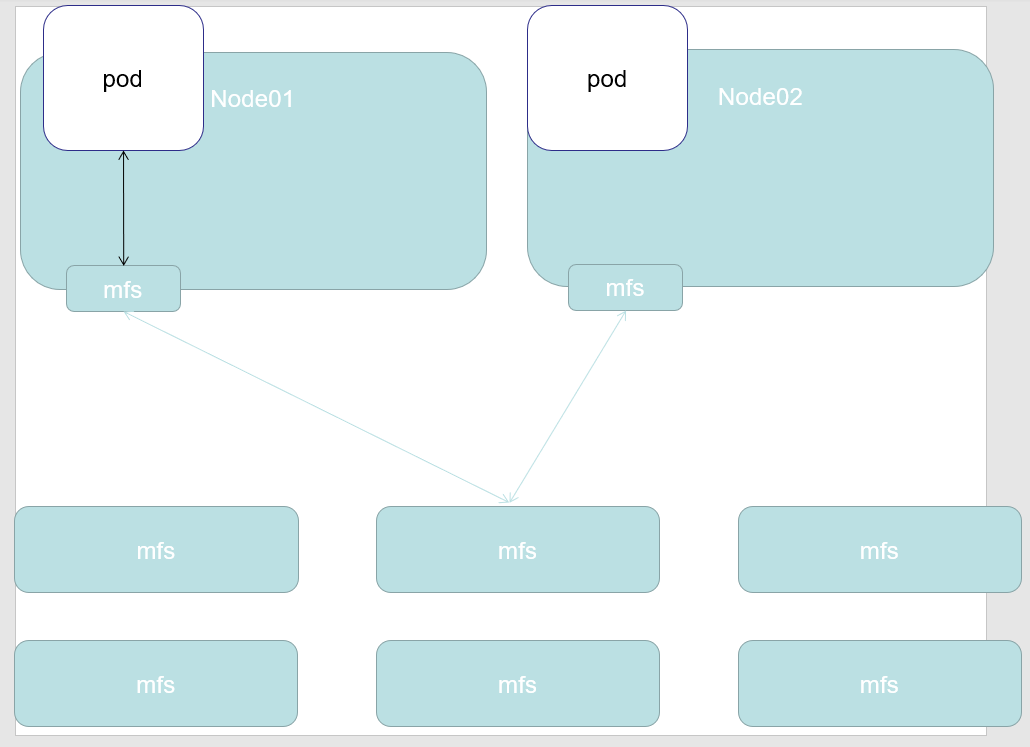
当一个 Pod 调度到一个节点上之后,kubelet 就要负责为这个 Pod 创建它的 Volume 目录。默认情况下,kubelet 为 Volume 创建的目录是如下所示的一个宿主机上的路径:
1
/var/lib/kubelet/pods/<Pod的ID>/volumes/kubernetes.io~<Volume类型>/<Volume名字>

接下来,kubelet 要做的操作就取决于 Volume 类型。

eg: 远程磁盘

  1. attach:将远程磁盘挂载到 pod 所在 node 节点上(nfs 等不在远程的,可以直接执行第二步)(nodeName,即宿主机的名字)
  2. mount:格式化此磁盘,然后将它挂载到宿主机的指定挂载点(dir,即 Volume 的宿主机目录)
1
2
3
4
5
6
7
8
9
10
11
# 过程类似于:
# 第一步
$ gcloud compute instances attach-disk <虚拟机名字> --disk <远程磁盘名字>

# 第二步
# 通过lsblk命令获取磁盘设备ID
$ sudo lsblk
# 格式化成ext4格式
$ sudo mkfs.ext4 -m 0 -F -E lazy_itable_init=0,lazy_journal_init=0,discard /dev/<磁盘设备ID>
# 挂载到挂载点
$ sudo mkdir -p /var/lib/kubelet/pods/<Pod的ID>/volumes/kubernetes.io~<Volume类型>/<Volume名字>

Local Persistent Volume

Kubernetes 能够直接使用宿主机上的本地磁盘目录,而不依赖于远程存储服务,来提供“持久化”的容器 Volume。

相比于正常的 PV,一旦这些节点宕机且不能恢复时,Local Persistent Volume 的数据就可能丢失。使用 Local Persistent Volume 的应用必须具备数据备份和恢复的能力,允许你把这些数据定时备份在其他位置。

难点:

  1. 如何把本地磁盘抽象成 PV
  2. 保证 Pod 始终能被正确地调度到它所请求的 Local Persistent Volume 所在的节点上

不应该把一个宿主机上的目录当作 PV 使用。这种本地目录的存储行为完全不可控,它所在的磁盘随时都可能被应用写满,甚至造成整个宿主机宕机,最好一块额外挂载在宿主机的磁盘或者块设备(“一个 PV 一块盘”)。

调度器就必须能够知道所有节点与 Local Persistent Volume 对应的磁盘的关联关系,然后根据这个信息来调度 Pod(“在调度的时候考虑 Volume 分布”)。

示例

  1. 在名叫 node-1 的宿主机上创建一个挂载点,比如 /mnt/disks;然后,用几个 RAM Disk 来模拟本地磁盘
1
2
3
4
5
6
# 在node-1上执行
$ mkdir /mnt/disks
$ for vol in vol1 vol2 vol3; do
mkdir /mnt/disks/$vol
mount -t tmpfs $vol /mnt/disks/$vol
done
  1. 为这些本地磁盘定义对应的 PV
1
2
3
4
5
6
7
8
9
10
11
12
13
14
15
16
17
18
19
20
21
22
apiVersion: v1
kind: PersistentVolume
metadata:
name: example-pv
spec:
capacity:
storage: 5Gi
volumeMode: Filesystem
accessModes:
- ReadWriteOnce
persistentVolumeReclaimPolicy: Delete
storageClassName: local-storage # 对应
local:
path: /mnt/disks/vol1
nodeAffinity:
required:
nodeSelectorTerms:
- matchExpressions:
- key: kubernetes.io/hostname
operator: In
values:
- node-1
  1. 创建一个 StorageClass 来描述这个 PV
1
2
3
4
5
6
kind: StorageClass
apiVersion: storage.k8s.io/v1
metadata:
name: local-storage # 对应
provisioner: kubernetes.io/no-provisioner # Local Persistent Volume 目前尚不支持 Dynamic Provisioning
volumeBindingMode: WaitForFirstConsumer # 延迟绑定 原本实时发生的 PVC 和 PV 的绑定过程,就被延迟到了 Pod 第一次调度的时候在调度器中进行
  1. 创建 PVC,apply 后还不会绑定,处于 pending 状态
1
2
3
4
5
6
7
8
9
10
11
kind: PersistentVolumeClaim
apiVersion: v1
metadata:
name: example-local-claim
spec:
accessModes:
- ReadWriteOnce
resources:
requests:
storage: 5Gi
storageClassName: local-storage # 对应
  1. 编写一个 Pod 来声明使用这个 PVC
1
2
3
4
5
6
7
8
9
10
11
12
13
14
15
16
17
18
kind: Pod
apiVersion: v1
metadata:
name: example-pv-pod
spec:
volumes:
- name: example-pv-storage
persistentVolumeClaim:
claimName: example-local-claim # pvc name
containers:
- name: example-pv-container
image: nginx
ports:
- containerPort: 80
name: "http-server"
volumeMounts:
- mountPath: "/usr/share/nginx/html"
name: example-pv-storage

删除流程:

  1. 删除使用这个 PV 的 Pod
  2. 从宿主机移除本地磁盘(比如,umount 它)
  3. 删除 PVC
  4. 删除 PV

如果不按照这个流程的话,这个 PV 的删除就会失败——原因是 kubernetes.io/pv-protection 这个 finalizer:只要还有 PVC 绑在上面,kubectl delete pv 会把 deletionTimestamp 写上去,但对象一直卡在 Terminating,等 PVC 先走。PVC 上也有对应的 kubernetes.io/pvc-protection,防的是”Pod 还在用就把 PVC 删了”。所以这个顺序不是习惯问题,是被 finalizer 强制的。

WaitForFirstConsumer 到底解决了什么

volumeBindingMode 默认是 Immediate,字面意思是”立刻绑定”。对 Local PV 来说,这个默认值会造成一个无法自愈的死局,这才是必须改成 WaitForFirstConsumer 的原因。

Immediate 模式下两件事的顺序是:

  1. PVC 一创建,PV controller 就立刻从可用 PV 里挑一个绑上(绑定是排他的、且不可撤销);
  2. 之后 scheduler 才开始给 Pod 找节点,而此时 PV 的 nodeAffinity 已经把 Pod 钉死在某个节点上了。

于是:假如被绑到的那个节点 CPU/内存不够、或者带着 Pod 不能容忍的污点,Pod 就永远 Pending。而且重试也救不回来——PVC 和 PV 的绑定不会因为调度失败而解开,你只能删掉 PVC 重来(还未必不撞上同一个 PV)。

WaitForFirstConsumer 把绑定推迟到第一次调度时:scheduler 的 VolumeBinding 插件在 Filter 阶段同时考虑 CPU、内存、亲和性、污点和 PV 的节点约束,一次性算出一个可行解,然后才提交绑定。也就是把”先绑再调度”改成了”调度和绑定一起决策”。

1
volumeBindingMode: WaitForFirstConsumer

判断要不要用它有个简单标准:PV 带节点约束就必须用。Local PV、hostPath、以及云上的区域盘(EBS/云硬盘只能挂在同一可用区的节点上)都属于这一类。反过来,NFS、CephFS 这类任何节点都能挂的存储,用 Immediate 没问题,还能省掉调度时的一轮计算。

副作用要知道一个:WaitForFirstConsumer 的 PVC 在没有 Pod 引用它之前会一直是 Pending 状态,这是正常的,不是故障——第一次见到很容易误判成 provisioner 坏了。

CSI

CSI 的设计思想,把插件的职责从“两阶段处理”,扩展成了 Provision、Attach 和 Mount 三个阶段。

  1. Provision 等价于“创建磁盘”
  2. Attach 等价于“挂载磁盘到虚拟机”
  3. Mount 等价于“将该磁盘格式化后,挂载在 Volume 的宿主机目录上”
1
2
3
4
5
6
7
8
kind: StorageClass
apiVersion: storage.k8s.io/v1
metadata:
name: do-block-storage
namespace: kube-system
annotations:
storageclass.kubernetes.io/is-default-class: "true" # 使用这个 StorageClass 作为默认的持久化存储提供者
provisioner: com.digitalocean.csi.dobs # 使用 com.digitalocean.csi.dobs 的 CSI 插件处理这个 StorageClass 相关的所有操作