📌 学习笔记 :本文为学习与实践过程中整理的技术笔记,内容梳理自官方文档与网络公开资料,主要用于知识沉淀与命令速查。
资源清单格式 1 2 # 生成一个 实例文件,然后可以自行修改 --dry-run 不会具体执行 kubectl create deploy my-deployment -n demo --image busybox --dry-run server -o yaml > my-deployment.yaml
一般字段
1 2 3 4 5 6 7 8 9 apiVersion: group/apiversion # 如果没有给定 group 名称,那么默认为 core,可以使用 kubectl api-versions # 获取当前 k8s 版本上所有apiVersio版本信息( 每个版本可能不同 ) kind: # 资源类别 metadata: # 资源元数据 name # 名字 namespace # 命名空间 lables # 标签,主要用来表示一些有意义且和对象密切相关的信息 annotations # 注解,主要用来记录一些非识别的信息,方便用户阅读查找等 spec: # 期望的状态(disired state) status: # 当前状态,本字段有 Kubernetes 自身维护,用户不能去定义
pod 一个pod 启动的第一个容器 pause, pod 中所有 容器都共享 pause 的网络存储卷等。即 Pod 中容器端口不能重复。
常见 pod-example.yaml
1 2 3 4 5 6 7 8 9 10 11 12 13 14 15 16 17 18 19 20 21 22 23 apiVersion: v1 # 指定当前描述文件遵循v1版本的Kubernetes API kind: Pod # 我们在描述一个pod metadata: name: twocontainers # 指定pod的名称 namespace: default # 指定当前描述的pod所在的命名空间 labels: # 指定pod标签 app: twocontainers annotations: # 指定pod注释 version: v1 releasedBy: weilai purpose: demo spec: containers: - name: myapp # 容器的名称 image: imwl/myapp:v1 # 创建容器所使用的镜像 ports: - containerPort: 80 # 应用监听的端口 - name: shell # 容器的名称 image: centos:7 # 创建容器所使用的镜像 command: # 容器启动命令 - "bin/bash" - "-c" - "sleep 10000"
在生产环境中,推荐使用 Deployment、StatefulSet、Job 或者 CronJob 等控制器来创建 Pod,而不推荐直接创建 Pod。
当使用 name: nginx_pod_example 报错
1 The Pod "nginx_pod_example" is invalid: metadata.name: Invalid value: "nginx_pod_example": a DNS-1123 subdomain must consist of lower case alphanumeric characters, '-' or '.', and must start and end with an alphanumeric character (e.g. 'example.com', regex used for validation is '[a-z0-9]([-a-z0-9]*[a-z0-9])?(\.[a-z0-9]([-a-z0-9]*[a-z0-9])?)*')
- containerPort:80 当格式错误时
1 error: error validating "pod_duplicate_port_example.yaml": error validating data: [ValidationError(Pod.spec.containers[0].ports[0]): invalid type for io.k8s.api.core.v1.ContainerPort: got "string", expected "map", ValidationError(Pod.spec.containers[1].ports[0]): invalid type for io.k8s.api.core.v1.ContainerPort: got "string", expected "map"]; if you choose to ignore these errors, turn validation off with --validate=false
测试 Pod 中容器端口重复 pod-duplicate-port-example.yaml
1 2 3 4 5 6 7 8 9 10 11 12 13 14 15 16 17 apiVersion: v1 kind: Pod metadata: name: nginx-pod-example labels: app: nginx version: latest spec: containers: - name: app image: nginx:latest ports: - containerPort: 80 - name: app-double-port image: nginx:latest ports: - containerPort: 80
定位过程如下
1 2 3 4 5 6 7 8 9 10 11 12 13 14 15 16 17 18 19 20 21 22 23 24 25 26 27 28 29 30 31 32 33 34 35 36 37 38 39 [root@k8s01 ~]# kubectl get pods # 查看 pods 状态 NAME READY STATUS RESTARTS AGE my-pod 1/1 Running 0 15m nginx-pod-example 1/2 Error 3 4m43s [root@k8s01 ~]# kubectl logs nginx-pod-example error: a container name must be specified for pod nginx-pod-example, choose one of: [app app-double-port] [root@k8s01 ~]# kubectl logs nginx-pod-example -c app-double-port # 查看 pods 中容器 app-double-port 日志 /docker-entrypoint.sh: /docker-entrypoint.d/ is not empty, will attempt to perform configuration /docker-entrypoint.sh: Looking for shell scripts in /docker-entrypoint.d/ /docker-entrypoint.sh: Launching /docker-entrypoint.d/10-listen-on-ipv6-by-default.sh 10-listen-on-ipv6-by-default.sh: Getting the checksum of /etc/nginx/conf.d/default.conf 10-listen-on-ipv6-by-default.sh: Enabled listen on IPv6 in /etc/nginx/conf.d/default.conf /docker-entrypoint.sh: Launching /docker-entrypoint.d/20-envsubst-on-templates.sh /docker-entrypoint.sh: Configuration complete; ready for start up 2020/08/09 15:19:30 [emerg] 1#1: bind() to 0.0.0.0:80 failed (98: Address already in use) nginx: [emerg] bind() to 0.0.0.0:80 failed (98: Address already in use) 2020/08/09 15:19:30 [emerg] 1#1: bind() to [::]:80 failed (98: Address already in use) nginx: [emerg] bind() to [::]:80 failed (98: Address already in use) 2020/08/09 15:19:30 [emerg] 1#1: bind() to 0.0.0.0:80 failed (98: Address already in use) nginx: [emerg] bind() to 0.0.0.0:80 failed (98: Address already in use) 2020/08/09 15:19:30 [emerg] 1#1: bind() to [::]:80 failed (98: Address already in use) nginx: [emerg] bind() to [::]:80 failed (98: Address already in use) 2020/08/09 15:19:30 [emerg] 1#1: bind() to 0.0.0.0:80 failed (98: Address already in use) nginx: [emerg] bind() to 0.0.0.0:80 failed (98: Address already in use) 2020/08/09 15:19:30 [emerg] 1#1: bind() to [::]:80 failed (98: Address already in use) nginx: [emerg] bind() to [::]:80 failed (98: Address already in use) 2020/08/09 15:19:30 [emerg] 1#1: bind() to 0.0.0.0:80 failed (98: Address already in use) nginx: [emerg] bind() to 0.0.0.0:80 failed (98: Address already in use) 2020/08/09 15:19:30 [emerg] 1#1: bind() to [::]:80 failed (98: Address already in use) nginx: [emerg] bind() to [::]:80 failed (98: Address already in use) 2020/08/09 15:19:30 [emerg] 1#1: bind() to 0.0.0.0:80 failed (98: Address already in use) nginx: [emerg] bind() to 0.0.0.0:80 failed (98: Address already in use) 2020/08/09 15:19:30 [emerg] 1#1: bind() to [::]:80 failed (98: Address already in use) nginx: [emerg] bind() to [::]:80 failed (98: Address already in use) 2020/08/09 15:19:30 [emerg] 1#1: still could not bind() # 发现 端口 80 被占用
即一个pod 启动的第一个容器 pause,pod 中所有 容器都共享 pause 的网络存储卷等。即Pod 中容器端口不能重复。
删除
1 2 [root@k8s01 ~]# kubectl delete -f pod_duplicate_port_example.yaml pod "nginx-pod-example" deleted
PodPreset 编写的 Pod 里追加的字段,都可以预先定义好
preset.yaml
1
2
3
4
5
6
7
8
9
10
11
12
13
14
15
16
17
apiVersion: settings.k8s.io/v1alpha1 kind: PodPreset metadata: name: allow-database spec: selector: matchLabels: role: frontend env: - name: DB_PORT value: "6379" volumeMounts: - mountPath: /cache name: cache-volume volumes: - name: cache-volume emptyDir: {}
编写的 pod文件
1 2 3 4 5 6 7 8 9 10 11 12 13 apiVersion: v1 kind: Pod metadata: name: website labels: app: website role: frontend # 匹配 PodPreset 标签 spec: containers: - name: website image: nginx ports: - containerPort: 80
结果
1 2 3 4 5 6 7 8 9 10 11 12 13 14 15 16 17 18 19 20 21 22 23 24 25 26 27 28 $ kubectl create -f preset.yaml $ kubectl create -f PodPreset_test.yaml $ kubectl get pod website -o yaml apiVersion: v1 kind: Pod metadata: name: website labels: app: website role: frontend annotations: podpreset.admission.kubernetes.io/podpreset-allow-database: "resource version" spec: containers: - name: website image: nginx volumeMounts: - mountPath: /cache name: cache-volume ports: - containerPort: 80 env: - name: DB_PORT value: "6379" volumes: - name: cache-volume emptyDir: {}
PodPreset 里定义的内容,只会在 Pod API 对象被创建之前追加在这个对象本身上,而不会影响任何 Pod 的控制器的定义
RS示例 nginx-RS.yaml
1 2 3 4 5 6 7 8 9 10 11 12 13 14 15 16 17 18 19 20 21 22 apiVersion: apps/v1 kind: ReplicaSet metadata: name: frontend spec: replicas: 3 selector: matchLabels: tier: frontend template: metadata: labels: tier: frontend spec: containers: - name: myapp image: nginx:latest env: - name: GET-HOSTS-FROM value: dns ports: - containerPort: 80
apiVersion: extensions/v1beta1 报错
1 error: unable to recognize "nginx-RS.yaml": no matches for kind "ReplicaSet" in version "extensions/v1beta1"
当前的k8s版本是1.18.6, 而目前的extensions/v1beta1 中并没有支持 ReplicaSet, 将配置文件内的 api 接口修改为 apps/v1.
最好使用 Deployment 而不是 RS
1 2 3 4 5 6 7 8 9 [root@k8s01 ~]# kubectl get rs NAME DESIRED CURRENT READY AGE frontend 3 3 3 5m41s [root@k8s01 ~]# kubectl get pods NAME READY STATUS RESTARTS AGE frontend-2w8z4 1/1 Running 0 5m51s frontend-hwh69 1/1 Running 0 5m51s frontend-j2pwv 1/1 Running 0 5m51s my-pod 1/1 Running 0 39m
Deployment示例 nginx-Deployment.yaml
1 2 3 4 5 6 7 8 9 10 11 12 13 14 15 16 17 18 19 20 21 22 23 24 25 26 apiVersion: apps/v1 kind: Deployment metadata: name: nginx-deployment spec: revisionHistoryLimit: 10 # revision保留个数 replicas: 3 selector: matchLabels: app: nginx minReadySeconds: 5 # 新建 pod 视为准备好的 最小等待时间 5 秒 updateStrategy: # 这里指定了更新策略 type: RollingUpdate # 进行滚动更新 # OnDelete 删除时 # Recreate 一次性删除所有 pod 然后重建 rollingUpdate: maxSurge: 2 # 升级过程中最多可以比原先设置多出的POD数量 maxUnavailable: 1 # 这是默认的值, 最多不可达 pod ## 这一块以上 控制器定义(包括期望状态) template: ## 被控制对象的模板 metadata: labels: app: nginx spec: containers: - name: nginx image: nginx:1.7.9 ports: - containerPort: 80
执行后
1 2 3 4 5 6 7 8 9 10 11 12 13 14 15 16 [root@k8s01 ~]# kubectl get pod NAME READY STATUS RESTARTS AGE frontend-2w8z4 1/1 Running 0 15m frontend-hwh69 1/1 Running 0 15m frontend-j2pwv 1/1 Running 0 15m my-pod 1/1 Running 0 49m nginx-deployment-5bf87f5f59-2m56p 1/1 Running 0 3m39s nginx-deployment-5bf87f5f59-lctkl 1/1 Running 0 3m39s nginx-deployment-5bf87f5f59-txqlp 1/1 Running 0 3m39s [root@k8s01 ~]# kubectl get rs NAME DESIRED CURRENT READY AGE frontend 3 3 3 16m nginx-deployment-5bf87f5f59 3 3 3 3m48s [root@k8s01 ~]# kubectl get deployment NAME READY UP-TO-DATE AVAILABLE AGE nginx-deployment 3/3 3 3 3m59s
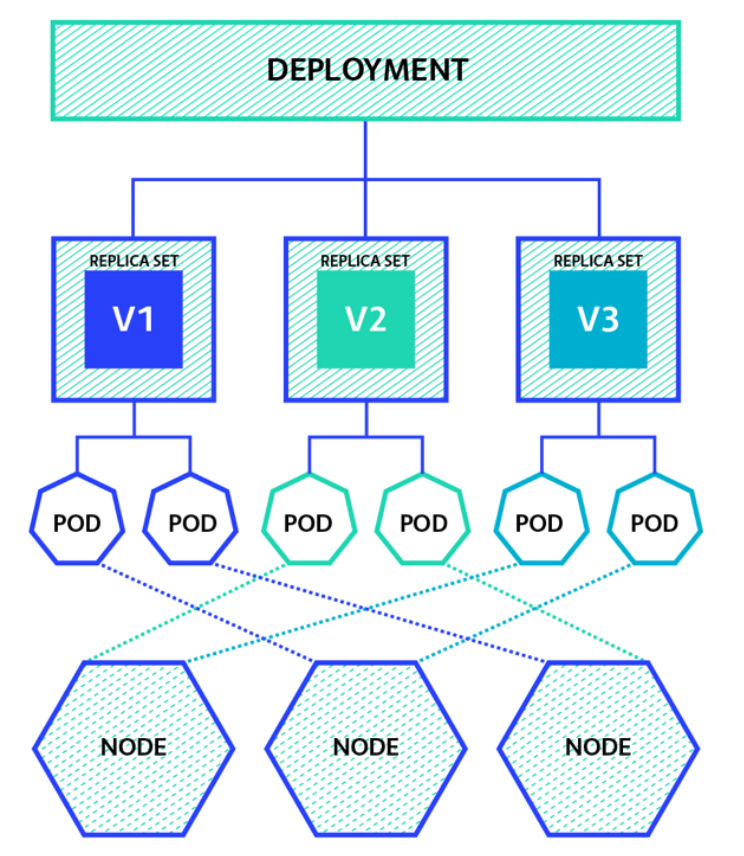
定义 Deployment , Deployment 是通过 RelicaSet 管理 Pod
多次修改 deployment 后 apply
1 2 3 4 5 6 7 8 9 10 11 12 13 14 15 16 17 18 kubectl rollout status deployment nginx-deploy # 查看当前升级状态 kubectl rollout pause deployment nginx-deploy # 暂停升级 kubectl rollout resume deployment nginx-deploy # 恢复升级 kubectl rollout history deployment nginx-deploy # 查看升级历史 kubectl rollout undo deployment nginx-deploy # 回滚到上一版本 # 所有通过kubectl xxxx --record都会被kubernetes记录到etcd进行持久化 # .spec.revisionHistoryLimit 来限制最大保留的revision number kubectl rollout history deployment nginx-deploy --revision=2 # 查看 revision=2 的信息 kubectl rollout undo deployment nginx-deploy --to-revision=2 # 恢复到 revision=2 kubectl rollout restart deployment nginx-deploy # 重启(触发滚动更新)
扩容缩容
1 2 3 kubectl scale deployment nginx-deployment --replicas=5 kubectl scale deployment nginx-deployment --replicas=2
自动扩缩容
1 kubectl autoscale deployment nginx-deployment --min=1 --max=10 --cpu-percent=80
DaemonSet示例 nginx-DaemonSet.yaml
1 2 3 4 5 6 7 8 9 10 11 12 13 14 15 16 apiVersion: apps/v1 kind: DaemonSet metadata: name: daemonset-example spec: selector: matchLabels: name: daemonset-example template: metadata: labels: name: daemonset-example spec: containers: - name: daemonset-example image: nginx:1.7.8
1 2 3 4 5 6 7 8 9 10 11 12 13 14 15 16 [root@k8s01 ~]# kubectl get pods -o wide NAME READY STATUS RESTARTS AGE IP NODE NOMINATED NODE READINESS GATES daemonset-example-6jht8 1/1 Running 0 2m45s 172.18.236.136 k8s02 <none> <none> daemonset-example-mz82g 1/1 Running 0 2m45s 172.18.235.135 k8s03 <none> <none> frontend-2w8z4 1/1 Running 0 24m 172.18.236.134 k8s02 <none> <none> frontend-hwh69 1/1 Running 0 24m 172.18.236.133 k8s02 <none> <none> frontend-j2pwv 1/1 Running 0 24m 172.18.235.132 k8s03 <none> <none> my-pod 1/1 Running 0 58m 172.18.235.131 k8s03 <none> <none> nginx-deployment-5bf87f5f59-2m56p 1/1 Running 0 12m 172.18.235.133 k8s03 <none> <none> nginx-deployment-5bf87f5f59-lctkl 1/1 Running 0 12m 172.18.235.134 k8s03 <none> <none> nginx-deployment-5bf87f5f59-txqlp 1/1 Running 0 12m 172.18.236.135 k8s02 <none> <none> [root@k8s01 ~]# kubectl get daemonset NAME DESIRED CURRENT READY UP-TO-DATE AVAILABLE NODE SELECTOR AGE daemonset-example 2 2 2 2 2 <none> 2m49s 调度机制,默认master没有
Job示例 pi-job.yaml
1 2 3 4 5 6 7 8 9 10 11 12 13 14 15 16 17 apiVersion: batch/v1 kind: Job metadata: name: pi spec: parallelism: 2 # 最大并行数 默认为 1 # completions: 4 # 最小完成数 # 不定义 completions 时,需自行决定什么时候 pod 算完成 # ttlSecondsAfterFinished: 100 # 该 Job 在运行结束 100 秒之后就被自动清理删除,实验功能 template: spec: containers: - name: pi image: resouer/ubuntu-bc command: ["sh", "-c", "echo 'scale=5000; 4*a(1)' | bc -l"] restartPolicy: Never # OnFailure 仅支持这两种 backoffLimit: 4 # 重试次数 默认为6 activeDeadlineSeconds: 100 # 最长运行时间 超过 100秒此job 就会终止
运行
1 2 3 4 5 6 7 8 9 10 11 12 13 14 15 16 17 18 19 20 21 22 23 24 25 26 27 28 29 30 31 32 33 34 35 [root@k8s01 stroage]# kubectl apply -f job.yaml job.batch/pi created [root@k8s01 stroage]# kubectl describe jobs/pi Name: pi Namespace: default Selector: controller-uid=e896b336-dfde-49c3-9451-aef9204b261d Labels: controller-uid=e896b336-dfde-49c3-9451-aef9204b261d job-name=pi Annotations: <none> Parallelism: 2 Completions: <unset> Start Time: Sat, 30 Jan 2021 23:21:43 +0800 Active Deadline Seconds: 100s Pods Statuses: 2 Running / 0 Succeeded / 0 Failed Pod Template: Labels: controller-uid=e896b336-dfde-49c3-9451-aef9204b261d job-name=pi Containers: pi: Image: resouer/ubuntu-bc Port: <none> Host Port: <none> Command: sh -c echo 'scale=5000; 4*a(1)' | bc -l Environment: <none> Mounts: <none> Volumes: <none> Events: Type Reason Age From Message ---- ------ ---- ---- ------- Normal SuccessfulCreate 38s job-controller Created pod: pi-pz6wv Normal SuccessfulCreate 38s job-controller Created pod: pi-ss82f
系统自动给 Job 添加了 Selector : controller-uid=e896b336-dfde-49c3-9451-aef9204b261d
Job 上会自动被加上了 Label :controller-uid=e896b336-dfde-49c3-9451-aef9204b261d 和 job-name=piJob spec.podTemplate 中也被加上了 Label,即 controller-uid=e896b336-dfde-49c3-9451-aef9204b261d 和 job-name=pi。这样 Job 就可以通过这些 Label 和 Pod 关联起来,从而控制 Pod 的创建、删除等操作.
1 2 3 4 5 6 7 8 [root@k8s01 stroage]# kubectl get pod --selector=controller-uid=896b336-dfde-49c3-9451-aef9204b261d NAME READY STATUS RESTARTS AGE pi-9cljf 0/1 Completed 0 2m15s pi-khbct 0/1 Completed 0 2m15s [root@k8s01 stroage]# kubectl logs pi-khbct 3.141592653589793238462643383279502884197169399375105820974944592307....
CronJob
⚠️ 注:batch/v1beta1 的 CronJob 已在 Kubernetes 1.25 移除。自 1.21 起 CronJob 已转为稳定版,新版请使用 apiVersion: batch/v1。
CronJob_test.yaml
1 2 3 4 5 6 7 8 9 10 11 12 13 14 15 16 17 18 19 20 21 22 [root@k8s01 stroage]# cat CronJob_test.yaml apiVersion: batch/v1beta1 kind: CronJob metadata: name: hello # cronjob 名字 spec: schedule: "*/1 * * * *" # 每 1 分钟执行一次 concurrencyPolicy: Replace # 并发策略,Replace:取消当前正在运行的 Job,用一个新的来替换 failedJobsHistoryLimit: 1 # 失败任务历史显示个数 startingDeadlineSeconds: 200 # 在过去的 200秒,如果 miss 的数目达到了 100 次,那么这个 Job 就不会被创建执行了。 jobTemplate: spec: template: spec: containers: - name: hello image: busybox args: - /bin/sh - -c - date;echo hello from the Kubernetes cluster restartPolicy: OnFailure
concurrencyPolicy
Allow : 默认值,允许并发任务的执行
Forbid : 不允许并发任务执行
Replace : 用新的 Job 来替换当前正在运行的老的 Job
查看
1 2 3 4 5 6 7 8 9 10 11 12 13 14 15 16 17 18 [root@k8s01 stroage]# kubectl get cronjobs NAME SCHEDULE SUSPEND ACTIVE LAST SCHEDULE AGE hello */1 * * * * False 0 31s 1m46s [root@k8s01 stroage]# kubectl get pod NAME READY STATUS RESTARTS AGE hello-1612021620-mclcn 0/1 Completed 0 2m5s hello-1612021680-ch6r2 0/1 Completed 0 74s hello-1612021740-wc57x 0/1 Completed 0 14s [root@k8s01 stroage]# kubectl logs hello-1612021740-wc57x Sat Jan 30 15:49:03 UTC 2021 hello from the Kubernetes cluster [root@k8s01 stroage]# kubectl logs hello-1612021680-ch6r2 Sat Jan 30 15:48:02 UTC 2021 hello from the Kubernetes cluster
补 1 2 3 4 5 6 7 8 9 10 11 12 13 14 15 16 17 18 19 20 21 22 23 24 25 26 27 28 29 30 31 32 33 34 35 36 37 38 39 40 41 42 43 44 45 46 47 48 49 50 51 52 53 54 55 56 57 58 59 60 61 62 63 64 65 66 67 68 69 70 71 72 73 74 75 76 77 78 79 80 81 82 83 84 85 86 87 88 89 90 91 92 93 94 95 96 97 98 99 100 101 102 103 104 105 106 107 108 109 110 111 112 113 114 115 116 117 118 119 120 121 122 123 124 125 126 127 128 129 130 131 132 133 134 135 136 137 138 139 140 141 142 143 144 145 146 147 148 149 150 151 152 153 154 155 156 157 158 159 160 161 162 163 164 165 166 167 168 169 170 171 172 173 174 175 176 177 [root@k8s01 ~]# kubectl get pod my-pod --o yaml # 将资源的配置以 yaml格式输出 apiVersion: v1 kind: Pod metadata: annotations: cni.projectcalico.org/podIP: 172.18.235.131/32 cni.projectcalico.org/podIPs: 172.18.235.131/32 kubectl.kubernetes.io/last-applied-configuration: | {"apiVersion":"v1","kind":"Pod","metadata":{"annotations":{},"labels":{"app":"nginx","version":"latest"},"name":"my-pod","namespace":"default"},"spec":{"containers":[{"image":"nginx:latest","name":"app","ports":[{"containerPort":80}]}]}} creationTimestamp: "2020-08-09T15:03:15Z" labels: app: nginx version: latest managedFields: - apiVersion: v1 fieldsType: FieldsV1 fieldsV1: f:metadata: f:annotations: .: {} f:kubectl.kubernetes.io/last-applied-configuration: {} f:labels: .: {} f:app: {} f:version: {} f:spec: f:containers: k:{"name":"app"}: .: {} f:image: {} f:imagePullPolicy: {} f:name: {} f:ports: .: {} k:{"containerPort":80,"protocol":"TCP"}: .: {} f:containerPort: {} f:protocol: {} f:resources: {} f:terminationMessagePath: {} f:terminationMessagePolicy: {} f:dnsPolicy: {} f:enableServiceLinks: {} f:restartPolicy: {} f:schedulerName: {} f:securityContext: {} f:terminationGracePeriodSeconds: {} manager: kubectl operation: Update time: "2020-08-09T15:03:15Z" - apiVersion: v1 fieldsType: FieldsV1 fieldsV1: f:metadata: f:annotations: f:cni.projectcalico.org/podIP: {} f:cni.projectcalico.org/podIPs: {} manager: calico operation: Update time: "2020-08-09T15:03:16Z" - apiVersion: v1 fieldsType: FieldsV1 fieldsV1: f:status: f:conditions: k:{"type":"ContainersReady"}: .: {} f:lastProbeTime: {} f:lastTransitionTime: {} f:status: {} f:type: {} k:{"type":"Initialized"}: .: {} f:lastProbeTime: {} f:lastTransitionTime: {} f:status: {} f:type: {} k:{"type":"Ready"}: .: {} f:lastProbeTime: {} f:lastTransitionTime: {} f:status: {} f:type: {} f:containerStatuses: {} f:hostIP: {} f:phase: {} f:podIP: {} f:podIPs: .: {} k:{"ip":"172.18.235.131"}: .: {} f:ip: {} f:startTime: {} manager: kubelet operation: Update time: "2020-08-09T15:05:23Z" name: my-pod namespace: default resourceVersion: "45037" selfLink: /api/v1/namespaces/default/pods/my-pod uid: aab6a853-f6b4-45cb-b8be-bd3a0307c865 spec: containers: - image: nginx:latest imagePullPolicy: Always name: app ports: - containerPort: 80 protocol: TCP resources: {} terminationMessagePath: /dev/termination-log terminationMessagePolicy: File volumeMounts: - mountPath: /var/run/secrets/kubernetes.io/serviceaccount name: default-token-rr77c readOnly: true dnsPolicy: ClusterFirst enableServiceLinks: true nodeName: k8s03 priority: 0 restartPolicy: Always schedulerName: default-scheduler securityContext: {} serviceAccount: default serviceAccountName: default terminationGracePeriodSeconds: 30 tolerations: - effect: NoExecute key: node.kubernetes.io/not-ready operator: Exists tolerationSeconds: 300 - effect: NoExecute key: node.kubernetes.io/unreachable operator: Exists tolerationSeconds: 300 volumes: - name: default-token-rr77c secret: defaultMode: 420 secretName: default-token-rr77c status: conditions: - lastProbeTime: null lastTransitionTime: "2020-08-09T15:03:16Z" status: "True" type: Initialized - lastProbeTime: null lastTransitionTime: "2020-08-09T15:05:23Z" status: "True" type: Ready - lastProbeTime: null lastTransitionTime: "2020-08-09T15:05:23Z" status: "True" type: ContainersReady - lastProbeTime: null lastTransitionTime: "2020-08-09T15:03:15Z" status: "True" type: PodScheduled containerStatuses: - containerID: docker://c0deb071489b78bbcdb8b285ee1ae28684779813e2d5c601921de3ff991e1cd4 image: nginx:latest imageID: docker-pullable://nginx@sha256:36b74457bccb56fbf8b05f79c85569501b721d4db813b684391d63e02287c0b2 lastState: {} name: app ready: true restartCount: 0 started: true state: running: startedAt: "2020-08-09T15:05:23Z" hostIP: 192.168.43.103 phase: Running podIP: 172.18.235.131 podIPs: - ip: 172.18.235.131 qosClass: BestEffort startTime: "2020-08-09T15:03:16Z"